Scope of work
UX/UI
Research
Complex Systems
Client
Alta
Product
Sales Platform / B2B
Year
2026
About Alta | AI GTM System of actions
Alta AI is a sales intelligence and data platform that helps business teams find, build, and enrich target audiences. It allows sales and marketing professionals to create custom buyer lists, enrich prospect data with AI, and attach tailored audiences directly to outreach campaigns.
The Problem
Building lead lists and enriching contact data often feels disconnected from actual marketing campaigns. Users struggle with managing contacts as raw lists rather than structured audiences tied directly to specific campaign goals.
Quick UX Solutions
Smart Audience Builder: Simple steps to filter, group, and target the right people or companies without complex queries.
Seamless Campaign Linking: A flexible flow that lets users assign existing audiences to campaigns or create brand-new audiences on the fly inside the campaign builder.
One-Click Data Enrichment: Easy-to-use action menus that automatically pull in missing emails, phone numbers, and company details using AI.
Screen Breakdown
Main Audience Overview
The main screen displays all created audience lists in a clean table view. Users can see list sizes, linked campaigns, creation dates, and status tags at a glance, making it easy to manage multiple target groups.

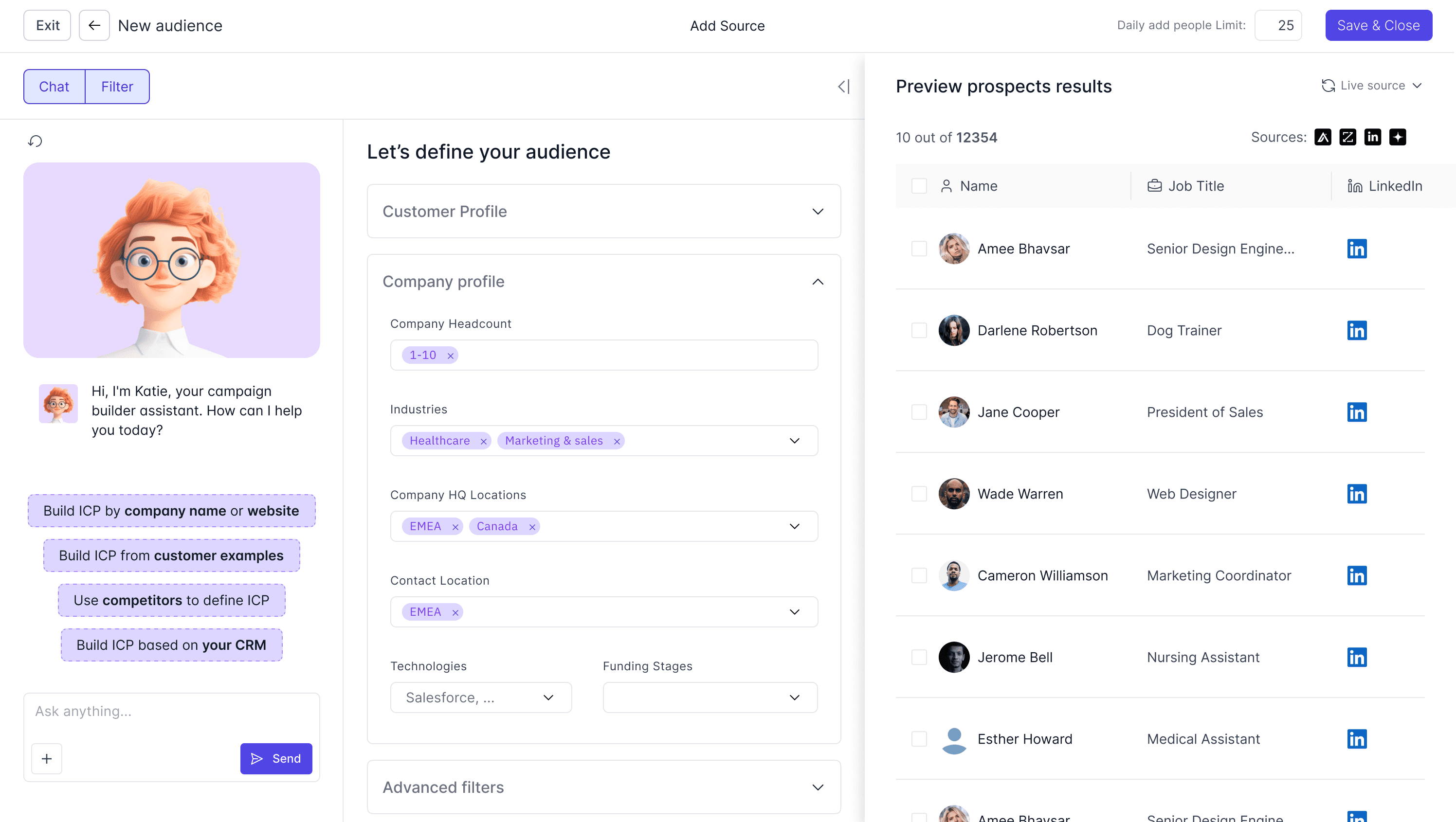
Audience Creation & Filters
When building a new audience, a step-by-step wizard guides the user through filtering by industry, company size, location, and job title. Clean selection cards and dropdowns keep the setup fast and error-free.


Profile Detail & Data Enrichment
Clicking on any contact or company opens a detailed side panel. Here, users can view full contact information and trigger AI enrichments to automatically discover missing emails, LinkedIn profiles, or phone numbers.


Campaign & Audience Integration
Instead of treating audiences as random collections of people, the system directly links each audience to its specific campaign. Users can attach an audience to an active campaign with one click—or create a brand-new audience from scratch directly inside the campaign setup workflow.


© Happyflowz Studio 2026
